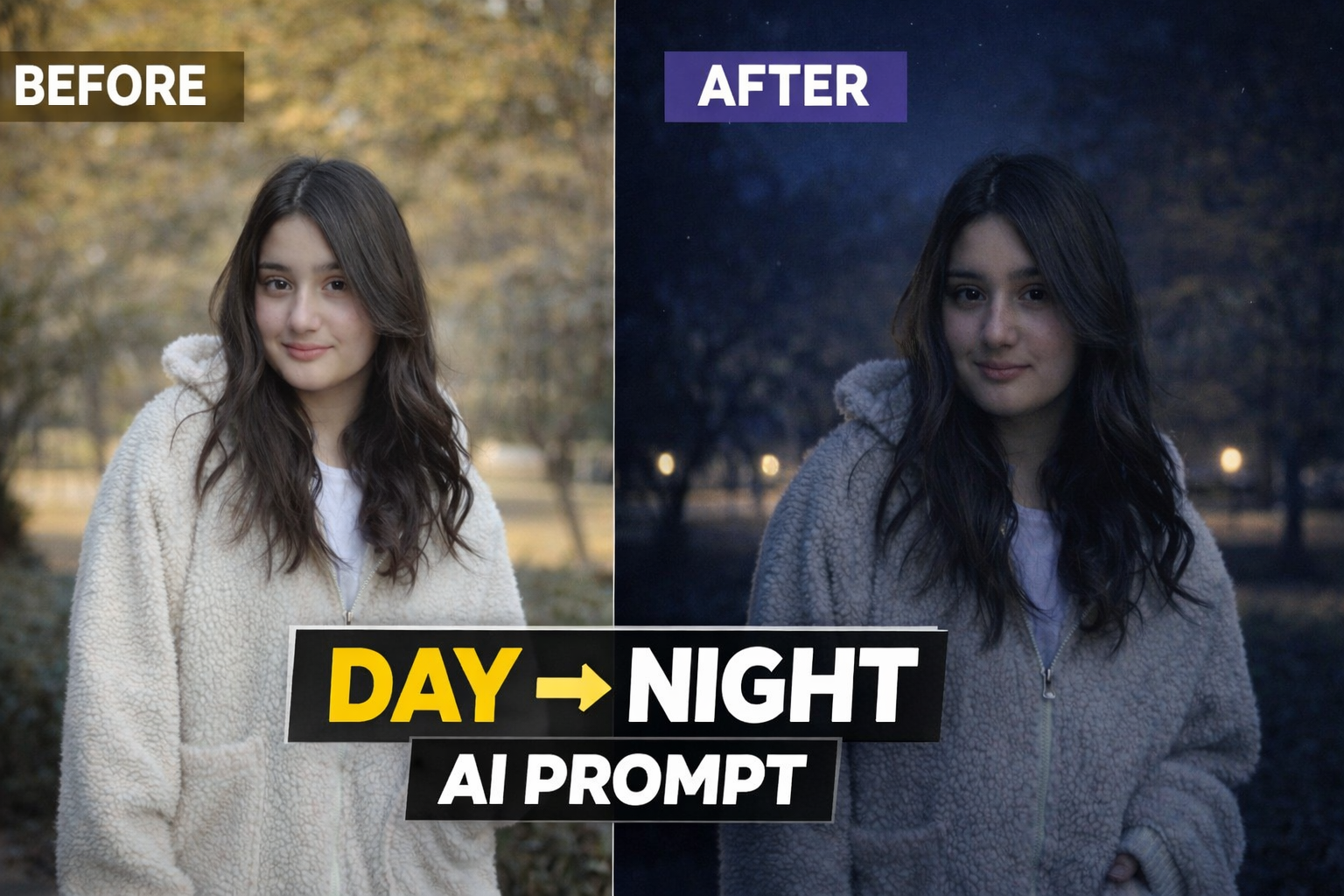
AI photo editing technology has made it easier than ever to transform ordinary photos into creative and cinematic visuals. Many creators are now using AI prompts to apply unique lighting effects and realistic environment changes without using complex editing software.
One of the most popular editing styles right now is the Day to Night transformation effect. This AI prompt allows you to convert a normal daylight photo into a dramatic nighttime scene while keeping the subject, pose and composition exactly the same.
In this post, we will share a powerful Day to Night AI photo editing prompt that can transform your normal image into a realistic night portrait with cinematic lighting and atmospheric mood. This style is perfect for Instagram posts, profile pictures, YouTube thumbnails and creative photography projects.
Use the uploaded image as the exact reference. Recreate the same composition, pose, framing, and perspective. Convert the scene into a realistic nighttime environment with natural dark blue night tones. Add subtle road or street lights in the background with a soft glow and deepen the background shadows. Illuminate the person slightly with soft ambient light (as if from a nearby street light) so the face and upper body are clearly visible while still maintaining a natural night look. Place 2–3 small faint stars in the sky. Ensure the result looks realistic, cinematic, and believable with balanced night lighting, not over-edited or artificial.
How This AI Prompt Works
This AI prompt works by changing the lighting environment and color tone of the original image while keeping the subject completely natural and unchanged. The prompt converts the daylight atmosphere into a realistic nighttime scene by adding darker tones, cinematic shadows and subtle light sources.
The goal of this editing style is not to change the person in the photo but to enhance the overall mood of the image. The AI focuses mainly on lighting effects, background darkness and atmospheric glow to create a natural night look.
This technique is widely used by digital creators who want to give their photos a dramatic and cinematic feel without doing complicated manual editing.
How To Use This AI Prompt
Using this AI prompt is very simple and beginner friendly. You just need your original photo and any AI image generation tool.
Step 1: Copy the AI prompt provided in this post.
Step 2: Open any AI image generator such as ChatGPT image tool, Gemini or Leonardo AI.
Step 3: Upload your original photo as a reference image.
Step 4: Paste the prompt and generate the image.
Step 5: Download the final result and use it for social media or creative projects.
Best Places To Use This Effect
This Day to Night AI editing style can be used in many different ways:
Instagram profile photos• YouTube thumbnails• Social media posts• Creative photography projects• Personal portfolio images
The cinematic night atmosphere makes the image more attractive and professional.
Conclusion
AI photo editing prompts are becoming a powerful tool for creators who want to generate high quality images quickly. With the help of this Day to Night AI prompt, you can transform a simple daylight photo into a cinematic night scene within seconds.
If you enjoy AI photo editing and creative photography, you can explore more prompts and editing ideas on our website. We regularly share new AI prompts that help users create unique and visually appealing images.
Leave a Reply