AI photo editing prompts are becoming extremely popular among creators who want to create stylish and cinematic images without complex editing. With the help of modern AI tools, it is now possible to transform a simple photo into a professional looking visual in just a few seconds.
One of the most trending styles right now is the Royal Enfield bike photo editing look. Images featuring classic motorcycles, confident poses and cinematic lighting often go viral on social media platforms like Instagram and YouTube. These types of photos attract a lot of attention because they combine powerful visuals with a stylish aesthetic.
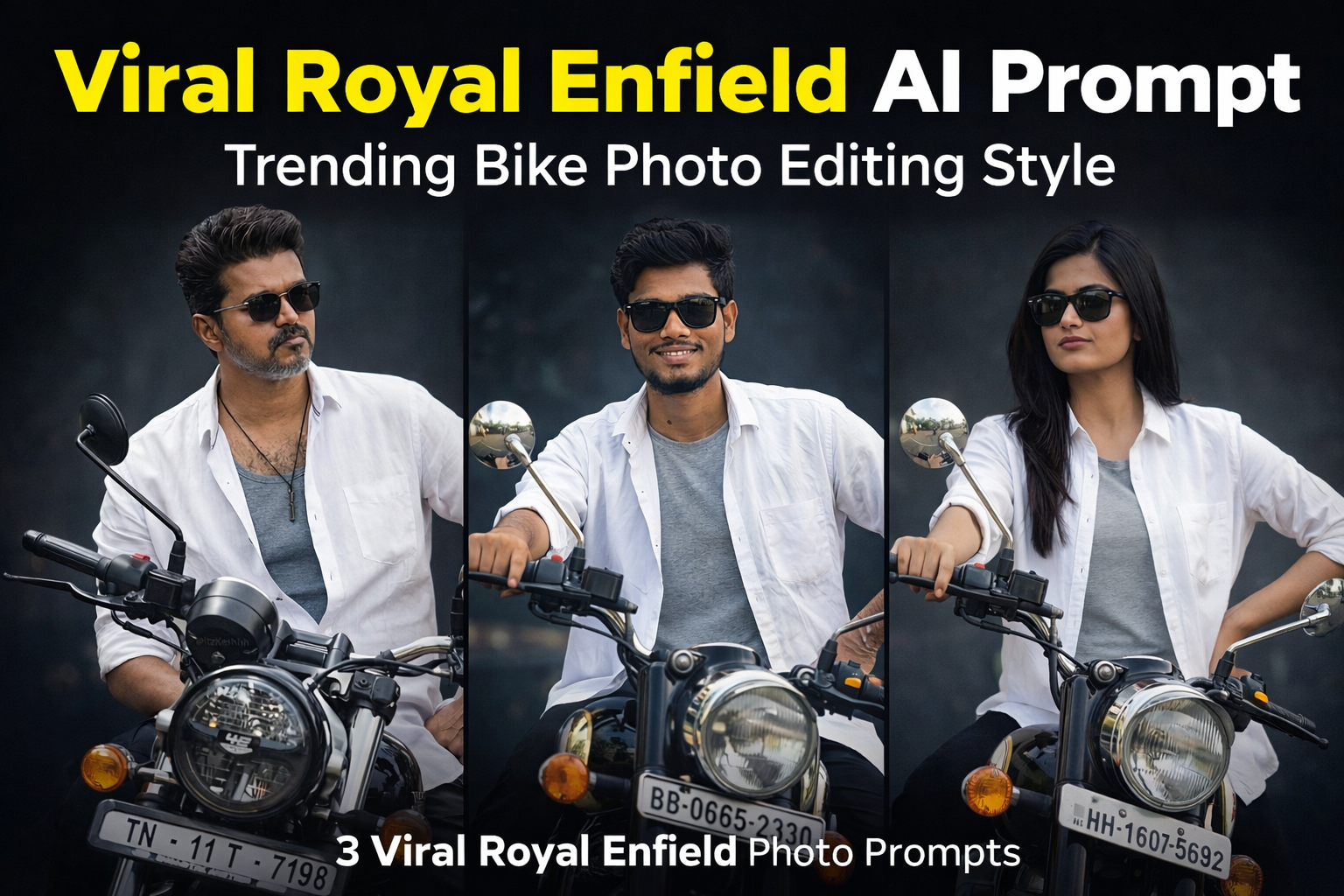
In this post, we are sharing 3 viral Royal Enfield AI photo editing prompts that can help you create similar cinematic bike portraits using AI tools. These prompts are designed to maintain the original face and pose while enhancing the lighting, mood and overall visual style of the image.
Royal Enfield Cinematic Bike Portrait
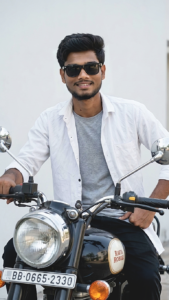
Use the uploaded image as the exact reference and recreate the scene identical with the same composition, pose, lighting and style. A stylish man sitting on a black classic motorcycle facing slightly left, wearing black sunglasses, a white open button-down shirt over a grey t-shirt, and black pants. One hand rests on the motorcycle handlebar while the other is placed on his hip. He has a neatly styled haircut with a short beard and moustache. The motorcycle headlight and mirrors are clearly visible in the foreground with a number plate on the front. Background is a clean minimal light wall creating a simple cinematic look. Natural soft daylight, realistic shadows, sharp details, shallow depth of field, ultra-realistic, photorealistic, 8K quality, no change to pose, lighting, angle, outfit or background.
How To Use This AI Prompt
Using these prompts is very simple and beginner friendly.
Step 1: Copy the AI prompt from this post.
Step 2: Open any AI image generator such as ChatGPT image tool, Gemini or Leonardo AI.
Step 3: Upload your original photo as a reference image.
Step 4: Paste the prompt and generate the image.
Step 5: Download the final result and use it for social media.
Why This Royal Enfield AI Prompt Is Trending
Royal Enfield motorcycles are known for their classic and powerful design. Because of this, photos featuring Royal Enfield bikes often look more stylish and cinematic. Many creators use these types of visuals for Instagram posts, reels covers and creative photography projects.
AI prompts make it possible to recreate these professional looking visuals easily without advanced editing skills.
Conclusion
Royal Enfield themed photo edits are becoming very popular among creators who want to create bold and stylish visuals. By using these AI prompts, you can easily generate cinematic bike portraits while keeping the original face and composition natural.
If you enjoy AI photo editing and creative photography, you can explore more prompts and editing ideas on our website where we regularly share new AI photo editing prompts.
AI photo editing technology has made it easier than ever to transform ordinary photos into creative and cinematic visuals. Many creators are now using AI prompts to apply unique lighting effects and realistic environment changes without using complex editing software.
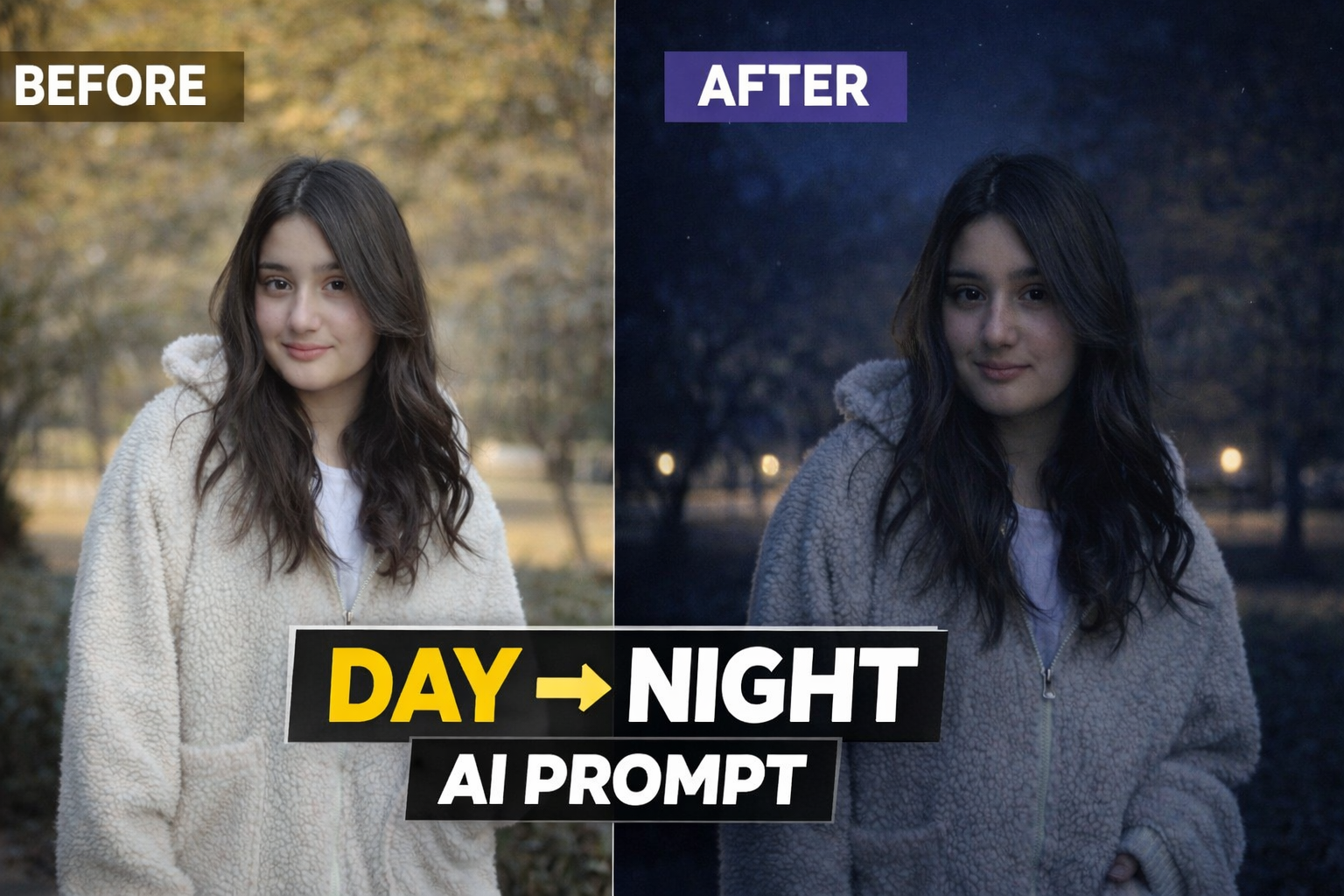
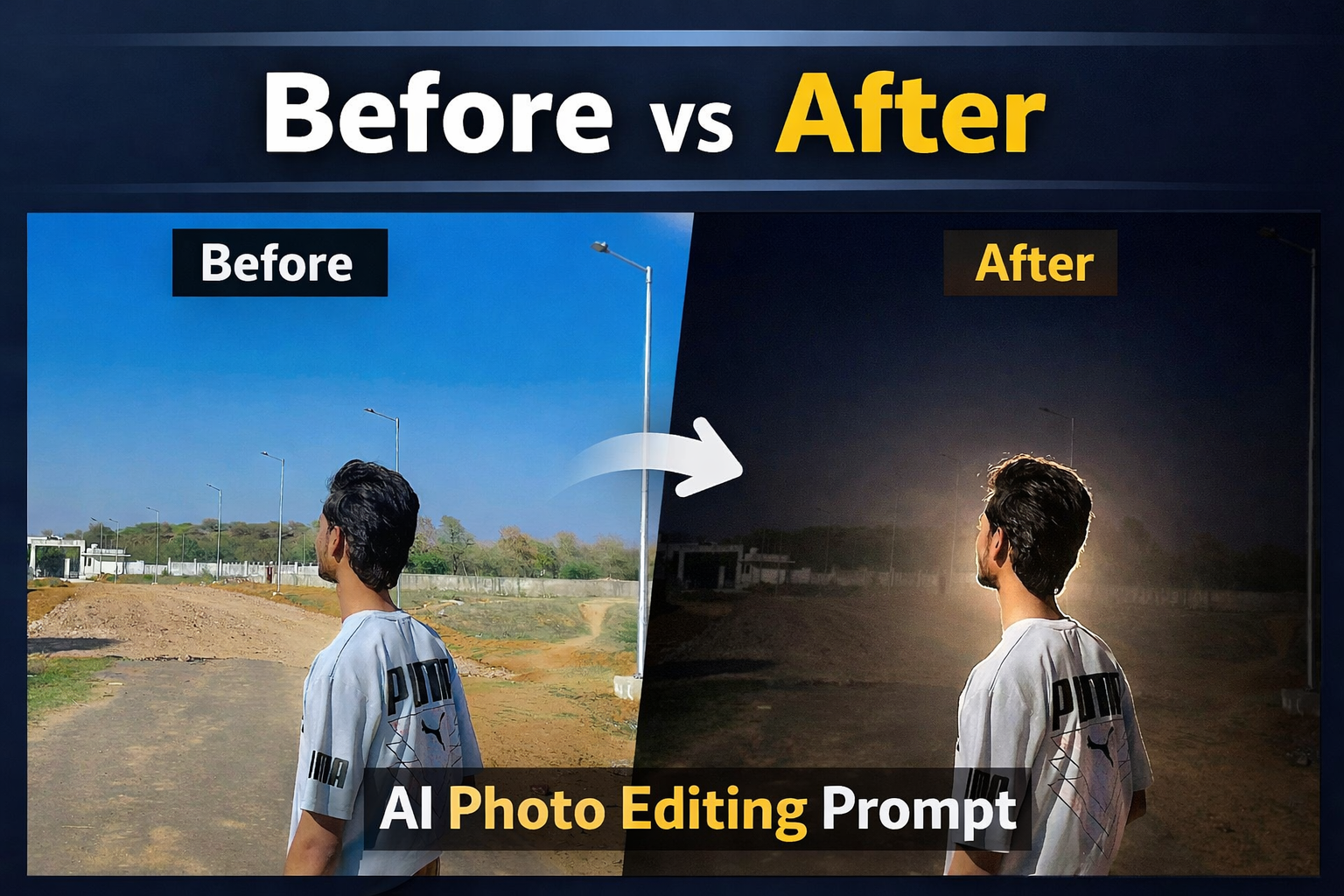
One of the most popular editing styles right now is the Day to Night transformation effect. This AI prompt allows you to convert a normal daylight photo into a dramatic nighttime scene while keeping the subject, pose and composition exactly the same.
In this post, we will share a powerful Day to Night AI photo editing prompt that can transform your normal image into a realistic night portrait with cinematic lighting and atmospheric mood. This style is perfect for Instagram posts, profile pictures, YouTube thumbnails and creative photography projects.
Use the uploaded image as the exact reference. Recreate the same composition, pose, framing, and perspective. Convert the scene into a realistic nighttime environment with natural dark blue night tones. Add subtle road or street lights in the background with a soft glow and deepen the background shadows. Illuminate the person slightly with soft ambient light (as if from a nearby street light) so the face and upper body are clearly visible while still maintaining a natural night look. Place 2–3 small faint stars in the sky. Ensure the result looks realistic, cinematic, and believable with balanced night lighting, not over-edited or artificial.
How This AI Prompt Works
This AI prompt works by changing the lighting environment and color tone of the original image while keeping the subject completely natural and unchanged. The prompt converts the daylight atmosphere into a realistic nighttime scene by adding darker tones, cinematic shadows and subtle light sources.
The goal of this editing style is not to change the person in the photo but to enhance the overall mood of the image. The AI focuses mainly on lighting effects, background darkness and atmospheric glow to create a natural night look.
This technique is widely used by digital creators who want to give their photos a dramatic and cinematic feel without doing complicated manual editing.
How To Use This AI Prompt
Using this AI prompt is very simple and beginner friendly. You just need your original photo and any AI image generation tool.
Step 1: Copy the AI prompt provided in this post.
Step 2: Open any AI image generator such as ChatGPT image tool, Gemini or Leonardo AI.
Step 3: Upload your original photo as a reference image.
Step 4: Paste the prompt and generate the image.
Step 5: Download the final result and use it for social media or creative projects.
Best Places To Use This Effect
This Day to Night AI editing style can be used in many different ways:
Instagram profile photos• YouTube thumbnails• Social media posts• Creative photography projects• Personal portfolio images
The cinematic night atmosphere makes the image more attractive and professional.
Conclusion
AI photo editing prompts are becoming a powerful tool for creators who want to generate high quality images quickly. With the help of this Day to Night AI prompt, you can transform a simple daylight photo into a cinematic night scene within seconds.
If you enjoy AI photo editing and creative photography, you can explore more prompts and editing ideas on our website. We regularly share new AI prompts that help users create unique and visually appealing images.
AI photo editing has become one of the fastest growing trends in digital content creation. Many creators are using AI prompts to transform their normal photos into cinematic and professional looking images.
With the help of AI image tools, anyone can easily generate high quality and creative visuals without advanced editing skills.On platforms like Instagram, YouTube and other social media networks, unique AI photo styles are becoming very popular. From cinematic portraits to creative storytelling images, AI prompts make it possible to create visually attractive photos in just a few seconds.
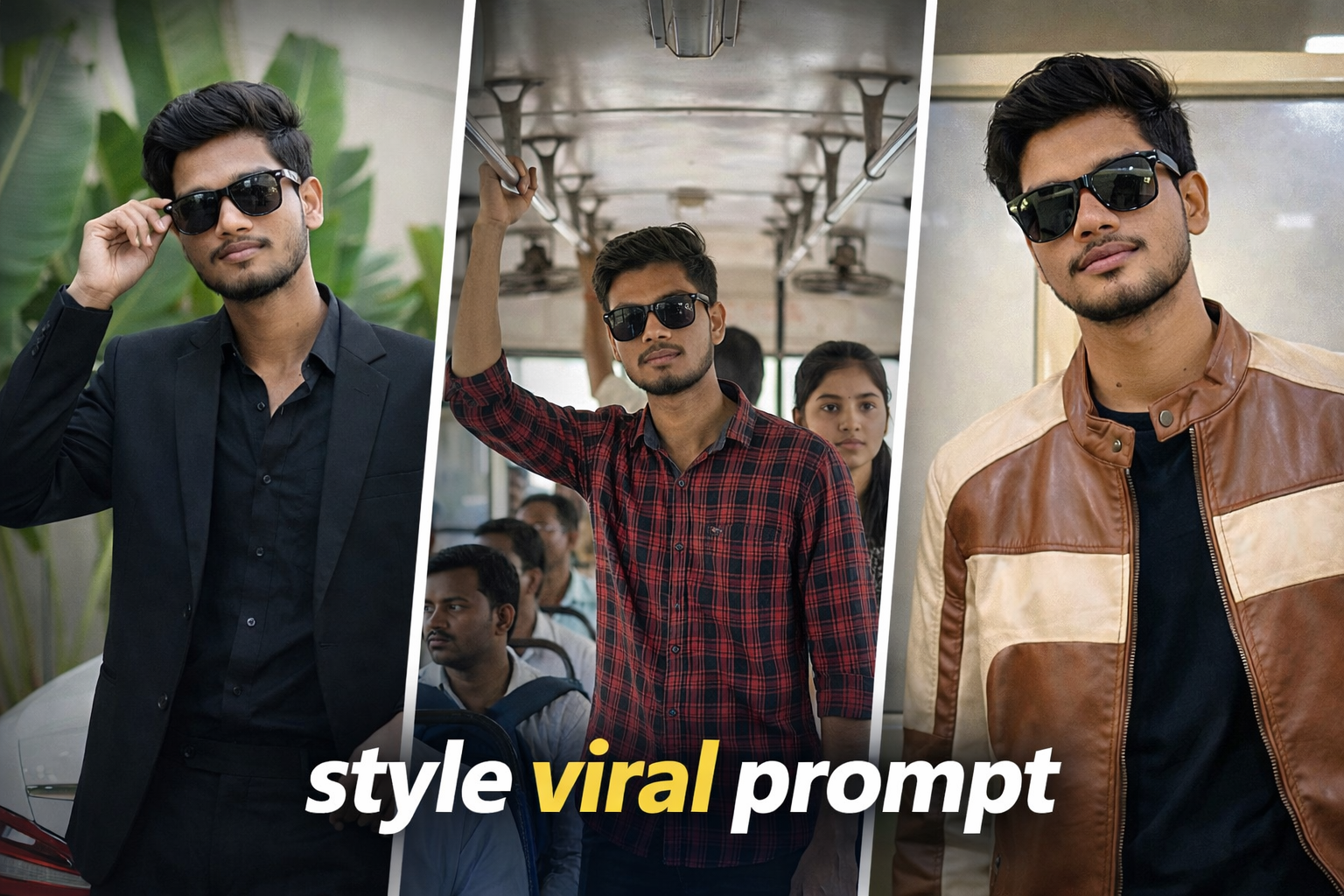
In this post, we are sharing 3 viral AI photo style prompts that you can use to turn your normal photo into a creative and professional looking image. These prompts are beginner friendly and can be used with most AI image generation tools.
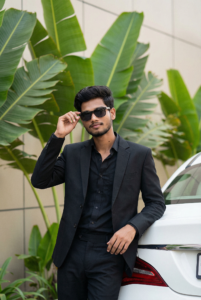
Use the uploaded image as the only reference.Keep the person exactly the same — same face, skin tone, curly hairstyle, facial structure, expression, body proportions and pose (100% face match, identity locked).Recreate the exact same scene and composition:Stylish outdoor portrait of the person standing in front of large tropical green leaves (banana-style foliage) near a modern building wall.He is wearing a black tailored suit with a black shirt underneath, slightly open at the collar.Right hand lifting/adjusting black sunglasses near the face, left arm resting casually on the rear of a white luxury car.Relaxed confident expression with a subtle smile.Background details must remain the same: Large layered green leaves filling most of the background, light beige exterior wall, natural outdoor setting, white car trunk visible on the right side.Camera & framing: Medium full vertical portrait (mid-thigh to head), eye-level angle, subject slightly left of center, natural balanced composition.Lighting: Soft natural daylight, even lighting on face and suit, gentle highlights on hair and leaves, realistic skin tone, minimal harsh shadows.Color & tone: Clean natural color grading, rich green foliage tones, deep blacks in suit, subtle contrast, sharp focus, shallow depth of field while background remains recognizable.Ultra-realistic, photorealistic, 8K resolution, crisp suit texture detail, sharp facial clarity, no pose change, no angle change, no outfit change, no extra elements, no text, no watermark, no distortion.
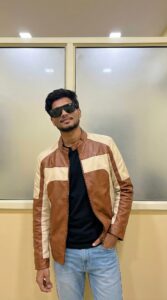
Use the uploaded image as the only reference.Keep the person exactly the same — same face, skin tone, hairstyle, facial structure, expression, body proportions and pose (100% face match, identity locked).Recreate the exact same scene and composition:Modern indoor fashion portrait of the person standing casually against a minimalist yellow-beige wall with two large frosted glass panels behind.He is wearing black oversized sunglasses, a black inner t-shirt, light blue jeans, and a brown-and-cream color-block leather jacket.Right hand placed inside the jeans pocket, left arm relaxed down, body slightly leaning to one side, chin slightly raised, confident relaxed expression.Camera & framing:Medium full-body vertical portrait (mid-thigh to head), eye-level angle, centered composition with symmetrical wall panels behind.Lighting:Soft indoor ambient lighting from above, clean even illumination on face and jacket, minimal harsh shadows, natural skin tone, subtle highlight on leather texture.Color & tone:Neutral warm indoor tones, soft contrast, clean fashion editorial look, accurate fabric texture details, sharp focus, shallow depth of field but background clearly defined.Ultra-realistic, photorealistic, 8K resolution, high-detail leather texture, crisp facial clarity, no pose change, no angle change, no outfit change, no extra elements, no text, no watermark, no distortion.
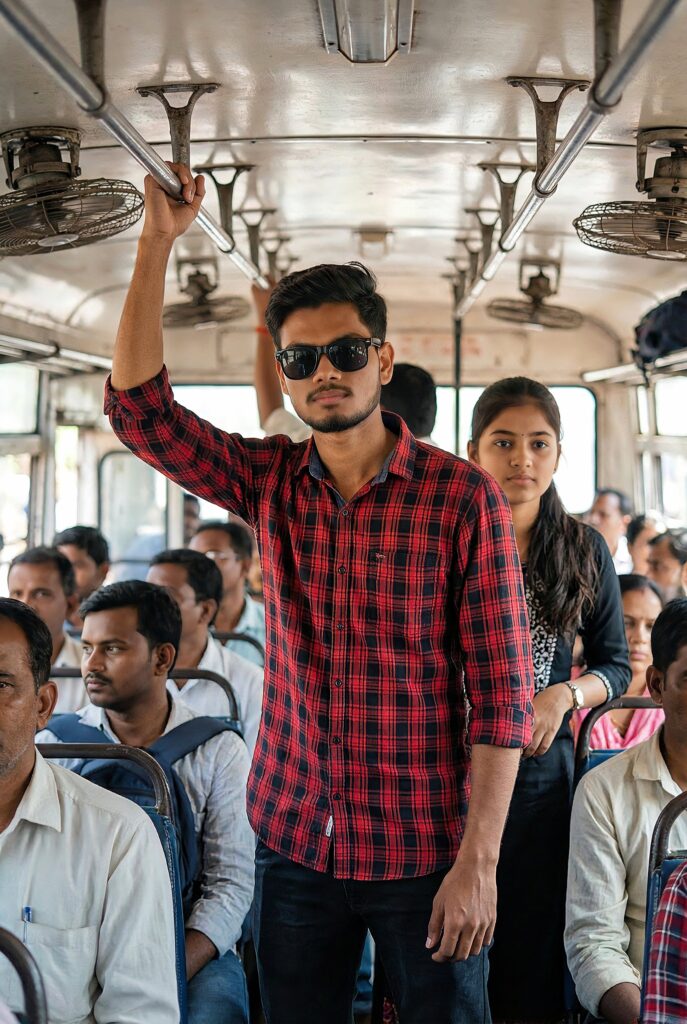
Use the uploaded image as the only reference.Keep the person exactly the same — same face, beard, hairstyle, skin tone, body build, expression, outfit, sunglasses, pose and proportions (100% face match).Recreate the exact same scene and composition:The person standing inside a crowded bus interior, slightly leaning forward with a dominant confident posture, wearing a red-black checkered shirt (sleeves rolled), dark pants, black sunglasses, light beard and styled hair.Right arm relaxed downward, left arm slightly bent, intense serious expression, head slightly tilted downward while looking forward.Background:Public bus interior with metal bars and overhead panels visible, passengers standing behind him slightly blurred, natural cramped space composition, same framing and crowd placement as reference.Camera & angle:Medium full-body vertical shot (mid-thigh to head), eye-level slightly low angle for powerful look, subject centered, natural tight indoor framing.Lighting & color:Soft natural indoor daylight filtering from bus windows, realistic skin tones, mild contrast, cinematic color grading, clean highlights, subtle shadow depth, sharp focus on subject, shallow depth of field.Ultra-realistic, photorealistic, 8K resolution, high detail, HDR, no pose change, no outfit change, no angle change, no extra elements, no text, no logos, no watermark, no distortion.
Conclusion
AI photo editing prompts are becoming a powerful tool for creators who want to generate unique and professional looking images. By using the right prompts, you can transform a simple photo into a cinematic visual within seconds.If you are a social media creator or someone who enjoys creative photography, these AI prompts can help you create impressive images easily. We regularly share new AI photo editing prompts and creative ideas on our website to help you explore different styles and techniques.
Why This AI Prompt Is Trending
AI photo editing prompts are becoming increasingly popular among social media creators and digital artists. The reason behind this trend is that AI tools allow users to transform normal photos into professional and cinematic visuals without complex editing skills.This particular AI photo style is trending because it combines realistic lighting, cinematic composition and modern portrait aesthetics. Many creators use this style for Instagram posts, YouTube thumbnails and personal branding images.
How To Use This AI Prompt
Using this AI prompt is very simple and beginner friendly. You just need a basic photo and an AI image generation tool.
Step 1: Copy the AI prompt provided in this post.
Step 2: Open any AI image generator such as ChatGPT, Gemini, Leonardo AI or similar tools.
Step 3: Upload your original photo as the reference image.
Step 4: Paste the prompt and generate the image.
Step 5: Download the final result and use it for your social media or creative projects.
Best Places To Use This AI Style
This type of cinematic AI photo style can be used for many different purposes:
• Instagram profile photos
• YouTube thumbnails
• Social media posts
• Personal portfolio images
• Creative photography projectsThe cinematic glow and realistic lighting make the final image look more professional and visually attractive.
AI photo editing prompts aaj ke time me digital creators ke liye ek powerful tool ban chuke hain. Social media platforms par cinematic glow effect wali images bahut fast viral ho rahi hain kyunki ye normal photos se zyada attractive aur professional lagti hain.
Is type ka glow lighting effect especially night portrait photography aur cinematic photo editing me use kiya jata hai. Jab subject ke peeche strong light source create kiya jata hai to ek natural halo effect ban jata hai jo photo ko dramatic aur artistic look deta hai.
AI tools ki help se ye process aur bhi easy ho gaya hai. Ab aapko complicated Photoshop editing karne ki zarurat nahi hoti. Sirf ek detailed AI prompt aur original photo upload karke bhi cinematic glow lighting effect generate kiya ja sakta hai.Isi wajah se AI glow effect prompts Instagram creators, YouTube thumbnail designers aur digital artists ke beech kaafi popular ho rahe hain. Ye prompt specially isi style ko achieve karne ke liye design kiya gaya hai taaki users apni normal photos ko cinematic glow portrait me convert kar saken.
Best Places to Use This Effect
Instagram reels cover photos
• YouTube thumbnails
• Profile pictures• Social media posts
• Creative portfolio images
• Poster style portraits
Agar aap social media creator ho to is type ki cinematic images audience ka attention jaldi attract karti hain aur aapke content ko aur professional bana deti hain.
AI Glow Effect Photo Editing Prompt
Apply a boidnight-flash aesthetic to the uploaded photo while fully preserving every original detail of the image. Hard rule: Do NOT change, reshape, beautify, replace, or alter the subject's face or hair in any way. Face identity, facial structure, skin details, and hair must remain 100% identical to the original photo. Pose, Composition & Framing (LOCKED) Keep the exact same pose, posture, body position, camera angle, framing, crop, and perspective Do NOT move, rotate, resize, or reposition the subject Do NOT alter lens characteristics, focal length, or framing Composition must remain pixel-identical, except for lighting effects. Lighting & Mood Maintain a dark, deep, realistic nighttime environment Preserve all existing shadows, silhouettes, and background details Do NOT brighten or modify the background, except for subtly enhancing existing point lights Illuminate the subject using a strong, warm, direct front-facing flash The subject must be the brightest element in the entire frame Flash focused on the face and upper body Strong separation between bright highlights and soft, deep shadows for a cinematic high-contrast look Add subtle lens bloom, light haze, and a thin atmospheric glow around the face and shoulders Render skin with luminous translucency and gentle peachy tones Enhance stray hair strands with soft backlit highlights Do NOT alter face texture, facial structure, or hair shape Final Goal: Create a cinematic night-flash portrait, with foreground blur and depth layers, while keeping the subject's face, pose, and composition perfectly untouched."
If you want more trending AI photo editing prompts, you can explore other posts available on our website. We regularly share new creative prompts and editing ideas to help creators generate unique and professional images.
Conclusion
AI photo editing prompts creators ke liye ek powerful aur creative tool ban chuke hain. Is post me share kiya gaya viral glow effect prompt aapko ek simple photo ko cinematic night glow portrait me convert karne me help karta hai. Agar aap social media creator, photographer ya digital artist ho to aise prompts aapke content ko aur professional aur visually attractive bana sakte hain.Aap is prompt ko Instagram posts, YouTube thumbnails, reels covers aur creative portfolio images banane ke liye use kar sakte ho. AI tools ki help se ab complex editing ki zarurat nahi hoti aur beginners bhi easily cinematic style images generate kar sakte hain.Agar aapko is type ke aur trending AI photo editing prompts chahiye to hamari website par available baaki posts bhi explore kar sakte ho. Yahan par regularly naye creative prompts aur editing ideas share kiye jaate hain jo aapke content creation ko aur easy aur professional bana sakte hain.
In recent years, cinematic AI photo editing has become very popular among creators and social media users. Many people want their normal photos to look dramatic, professional, and visually powerful with dark lighting, strong contrast, and a mysterious mood. In this post, you will find a high-quality AI photo editing prompt that can transform a simple portrait photo into a dark cinematic night portrait style.This prompt is specially designed to enhance lighting, shadows, and overall atmosphere while keeping the original face and pose of the subject natural. The goal is not to completely change the image but to give it a professional cinematic look that feels like a scene from a movie.This type of editing style is widely used for Instagram reels covers, profile photos, posters, and creative social media content. Even beginners can easily create this effect using modern AI tools such as ChatGPT image tools, Gemini, Leonardo AI, or other image generators.Below you will find the prompt along with step-by-step guidance on how to use it and tips to get the best results from your photo.
What is a Dark Cinematic Portrait Style?
Dark cinematic portrait style ek aisa photo editing concept hai jisme image ko dramatic aur movie-like look diya jata hai. Is style me lighting, shadows aur background atmosphere ka use karke ek mysterious aur powerful visual effect create kiya jata hai. Normally is type ki images me low-light environment, strong contrast aur focused lighting hoti hai jo subject ke face aur expression ko highlight karti hai.Is editing style ka main purpose ye hota hai ki normal photo ko ek professional cinematic scene jaisa feel diya ja sake. Isme background ko thoda dark aur moody rakha jata hai jabki subject par soft ya directional light use ki jati hai taaki depth aur realism create ho.Aaj kal social media creators, photographers aur digital artists is style ka use Instagram reels covers, profile photos, posters aur creative portfolio ke liye karte hain. AI tools ki help se ye effect banana ab kaafi easy ho gaya hai aur beginners bhi bina advanced editing skills ke cinematic results create kar sakte hain.
Why This AI Prompt Is Useful
Ye AI prompt specially un logon ke liye useful hai jo apni simple portrait photo ko cinematic aur professional look dena chahte hain. Is prompt ka focus subject ke original features ko preserve karte hue lighting aur background mood ko enhance karna hai.Iska matlab hai ki final image me face natural rahega lekin overall scene zyada dramatic aur visually appealing lagega.Is prompt ko use karke aap apni photos ko:cinematic portrait style me convert kar sakte hodark mood photography effect create kar sakte hosocial media ke liye eye-catching visuals bana sakte hoprofessional looking AI generated portraits create kar sakte ho
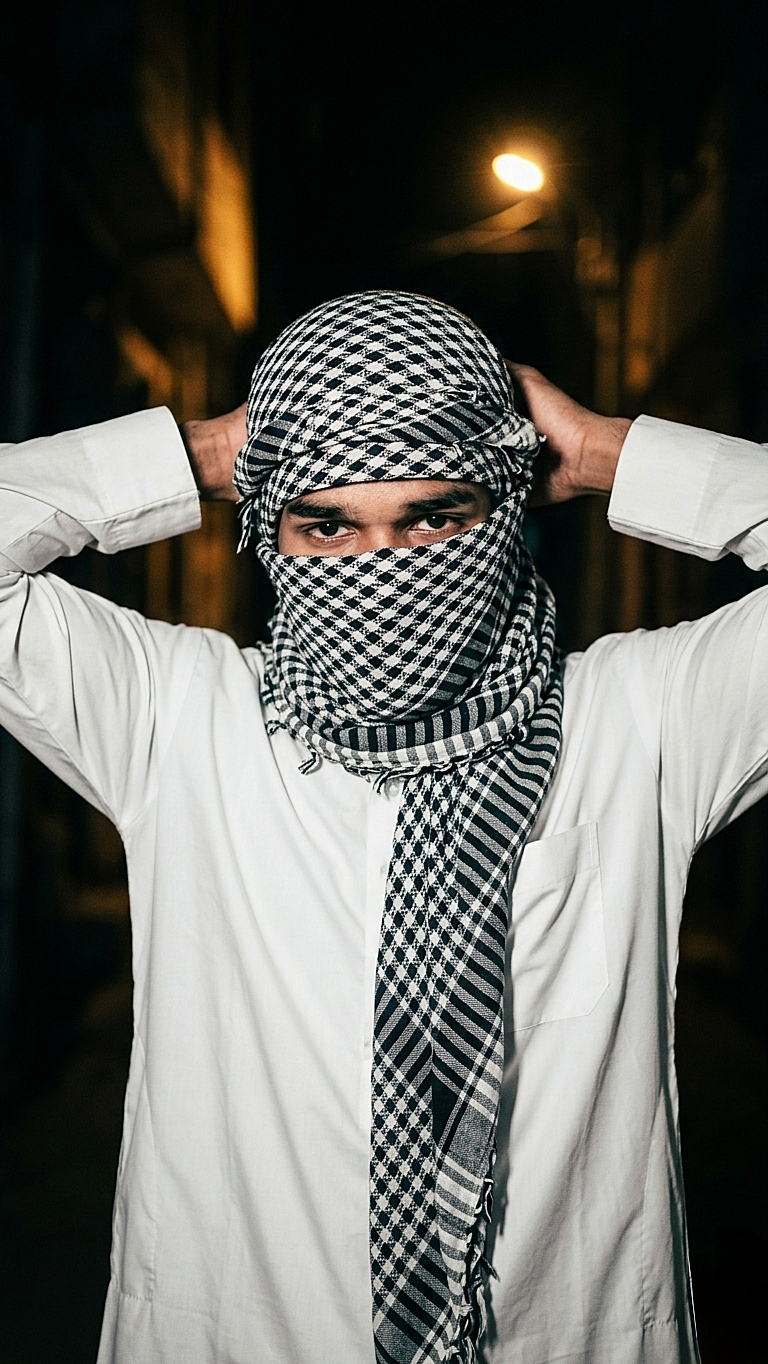
A high-contrast, low-light portrait of a young white tone man at night. He is wearing a white thobe and a traditional black and white keffiyeh wrapped around his head and face, with only his eyes visible. His hands are raised to his back of head, adjusting the fabric. The background is a dark, shadowy outdoor setting with a single warm light source in the distance. The overall mood is mysterious and gritty, with sharp focus on the patterns of the scarf.”
How to Use This AI Photo Editing Prompt
Is AI photo editing prompt ka use karna bahut simple hai. Agar aap beginner bhi ho to bhi aap easily is prompt ki help se cinematic portrait images create kar sakte ho. Neeche diye gaye steps follow karke aap apni normal photo ko professional cinematic style me convert kar sakte hain.
Step 1
Sabse pehle upar diya gaya AI prompt copy karein.
Step 2
Apna favourite AI image generator open karein jaise ChatGPT image tool, Gemini, Leonardo AI ya koi bhi reliable AI image generator.
Step 3
Copied prompt ko paste karein aur apni original portrait photo upload karein.
Step 4
Generate button par click karein aur AI ko image process karne dein.Step 5Image generate hone ke baad best result ko download karein aur apne social media ya personal projects me use karein.
Tips for Better Results
Agar aap best cinematic result chahte ho to kuch important baaton ka dhyaan rakhein:Photo clear aur high quality honi chahiye.Subject ka face properly visible hona chahiye.Background simple ho to AI ko subject identify karne me asaani hoti hai.Low light ya dramatic lighting wali photos par ye prompt aur bhi achha kaam karta hai.
Final Thoughts
AI photo editing aaj ke time me creative content banane ka ek powerful tool ban chuka hai. Is tarah ke cinematic prompts ki help se koi bhi normal photo ko ek dramatic aur professional visual style me convert kar sakta hai. Agar aap social media creator, photographer ya digital artist ho to aise AI prompts aapke creative workflow ko aur bhi fast aur interesting bana dete hain.Is post me diya gaya prompt specially cinematic dark portrait style ke liye design kiya gaya hai jisse lighting, background aur mood ek professional movie scene jaisa feel dete hain. Aap is prompt ko apni personal photos, social media posts, reels covers, thumbnails ya creative projects ke liye use kar sakte hain.Agar aap different variations try karna chahte hain to prompt me thode changes karke naye styles bhi generate kar sakte hain. AI tools ka advantage ye hai ki aap multiple results test karke best looking image choose kar sakte ho.Hamari website par regularly naye AI photo editing prompts aur creative ideas share kiye jaate hain jisse aap apne editing skills ko improve kar sakte ho aur unique content create kar sakte ho.
Disclaimer
Is post me share kiye gaye sabhi AI prompts educational aur creative purposes ke liye provide kiye gaye hain. Is page par dikhayi gayi images sirf example ke liye use ki gayi hain taaki users ko prompt ka expected result samajhne me help mile.Hum kisi bhi real person, public figure ya character ka official representation claim nahi karte. AI generated results different tools aur input images ke according change ho sakte hain.Users ko advise kiya jata hai ki AI generated images ka use responsibly karein aur kisi bhi platform ke rules aur policies ka dhyaan rakhein.
In this post, you will get a simple AI prompt to upscale your sunset photos into HDR quality with better colors, sharpness and realistic lighting.This prompt is only for educational and creative use.
How to use this prompt This prompt is for people who want to turn normal sunset photos into clean, colorful HDR style images using AI.Just upload your photo in Gemini or ChatGPT, paste the prompt below and generate your result. For best output, use a clear photo with visible sunset light and proper focus.
Transform this image into a dramatic sunset HDR style while preserving 100% of the original content. Do NOT change, add, remove, replace, or distort any object, subject, animal, person, building, tree, road, shadow, reflection, or background. Maintain the exact same: composition framing perspective w.compcation.foming camera angle subject positions shapes and proportions Colors must look realistic, not oversaturated, not artificial. No fantasy effects, no extra clouds, no extra sun, no lens flares, no fog, no rain unless already present. This is a strict color and lighting transformation only. Photorealistic sunset HDR edit. Original image must remain perfectly recognizable
Tips for best result
Agar aap better HDR look chahte ho to hamesha clear aur original photo use karein.Try karein ki image me natural sunset light clearly visible ho aur subject blur na ho.Mobile se li gayi normal photo par bhi ye prompt achha kaam karta hai.
Note
Ye prompt sirf educational aur creative purpose ke liye share kiya gaya hai.Final output aapke uploaded photo aur AI tool par depend karta hai.
Ye dark cinematic AI photo editing style un logon ke liye hai jo apni normal photos ko powerful, stylish aur professional look dena chahte hain.Is effect me moody lighting, smoke background aur cinematic depth use hoti hai jisse photo movie scene jaisi feel deti hai. Ye style reels, DP, posters aur social media content ke liye perfect hai.
Dark cinematic photo editing ek aisa style hota hai jisme photo ko movie-like dramatic look diya jaata hai. Is style me deep shadows, moody lighting, strong contrast aur background depth ka use hota hai jisse normal photo bhi professional cinematic shot jaise lagti hai.Aaj ke time me reels, Instagram DP, posters aur personal branding ke liye dark cinematic editing ka trend kaafi zyada popular ho raha hai. Is post me main aapko ek ready-to-use AI prompt ke saath saath ye bhi bataunga ki is prompt ka best use kaise karein taaki aapko realistic aur high-quality output mile.
🔹 What is Dark Cinematic AI Photo Editing?Dark cinematic AI photo editing ek AI based editing technique hai jisme aap apni normal photo ko sirf ek prompt ke through dramatic lighting, cinematic color grading aur professional look me convert kar sakte ho.
Is style ka main focus hota hai:low light cinematic mooddramatic rim lightsoft smoke / haze backgroundsharp subject separationrealistic skin tonesIs prompt ka use sirf lighting aur color mood change ke liye hota hai, subject ko badalne ke liye nahi.
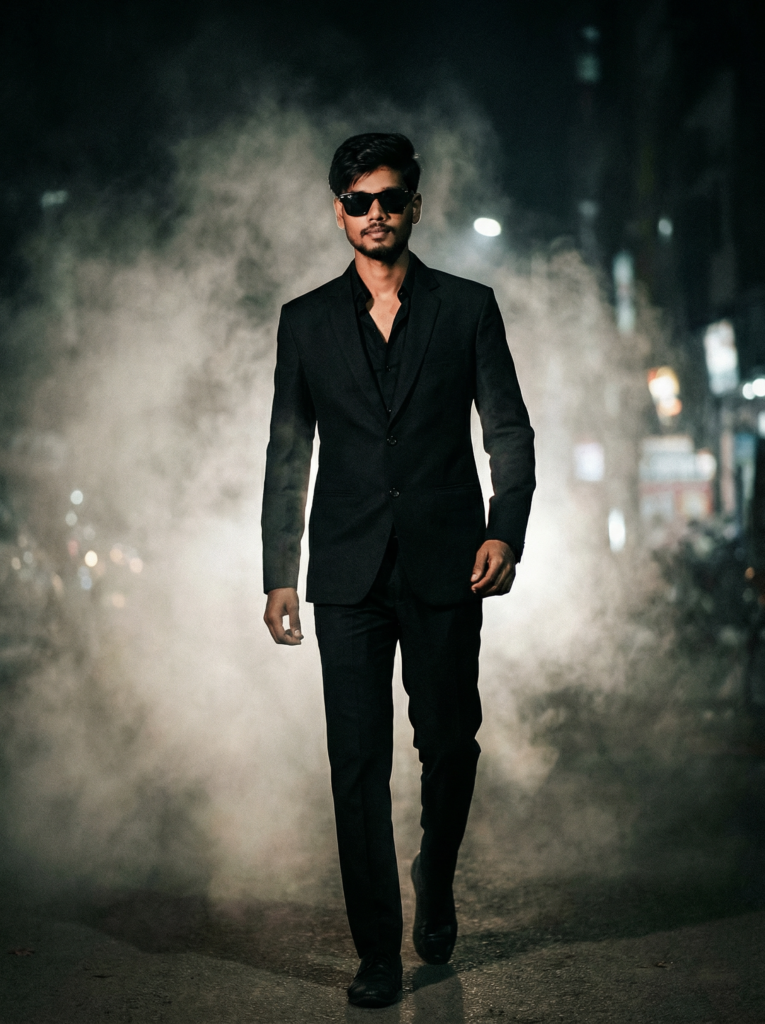
Ultra-cinematic full-body portrait of a 23-year-old person walking forward through thick cinematic smoke, dark moody atmosphere, intense gangster aura, light / less-grown beard suitable for 23 years, neatly trimmed, youthful masculine look, long swept hair, black sunglasses, sharp jawline, confident stride, same pose, same walking style, same look, wearing a black tailored suit with open collar shirt, dramatic rim lighting from behind, volumetric fog, high contrast shadows, desaturated color grading, epic movie poster style, shallow depth of field, realistic textures, hyper-realistic skin details, film grain, 8K ultra HD, professional cinematic photography, powerful composition, center framing, realistic proportions, 100% face match, ultra sharp focus, masterpiece quality.
prompt use karne ka tareeka 👇
1️⃣ Sabse pehle upar diya gaya prompt copy kare
2️⃣ Apna favourite AI image generator (ChatGPT / Gemini / Leonardo / Midjourney) open kare
3️⃣ Prompt paste kare aur apni photo upload kare
4️⃣ Generate hone ke baad best result ko download kar le
🔹 Who should use this prompt?
Ye prompt un logon ke liye perfect hai jo:Instagram reels banate hainDP / profile photo ko cinematic banana chahte hainposters ya thumbnails design karte hainapne personal photos ko professional look dena chahte hainAgar aap beginner ho tab bhi aap easily is prompt ka use kar sakte ho.
🔹 Best photo selection tips
(bahut important)Best result paane ke liye ye cheeze follow karo:photo clear ho (blur na ho)subject clearly visible hoface properly visible holighting bahut zyada harsh na hobackground simple hoAgar photo already thodi low light me ho to cinematic look aur better aata hai.
📌 Disclaimer:All images and results generated using this prompt are for educational and creative purposes only.Results may vary based on the AI tool and the image provided by the user.
Ye comic illustration pop art AI prompt un logon ke liye hai jo apni normal photos ko colorful, cartoon-style aur creative pop art look me convert karna chahte hain.Is prompt ki madad se aap couple photos, selfies ya single portraits ko vibrant comic illustration style me generate kar sakte ho, jisme bold outlines, bright colors aur pop-art background hota hai.Is style ka use aap Instagram posts, reels thumbnails, DP ya creative edits ke liye kar sakte ho. Ye prompt beginners aur creators dono ke liye useful hai jo AI image generators ka use karke unique visuals banana chahte hain.
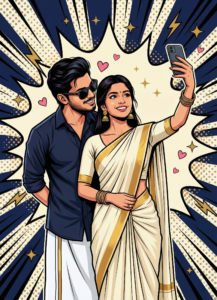
Use my uploaded photo as the exact face reference. Create a stylized pop-art comic illustration of a young Indian couple taking a selfie. The woman stands in front, holding a smartphone in her right hand, wearing an off-white saree with a gold border, gold jhumka earrings and bangles, left hand holding saree pleats. The man stands slightly behind her to the left, leaning in affectionately, wearing a dark navy blue button-up shirt with rolled sleeves and a white dhoti, hands behind his back, looking at her. Romantic pose. Background features a cream comic explosion burst with deep navy blue radial rays, halftone dots, gold sparkles, lightning shapes, and small pink hearts. Bold black outlines, clean vector pop-art style, high contrast, smooth shading, modern comic poster look. Use my uploaded pictures as a reference.
✨ Prompt Use Karne Ka Tarika
1️⃣ Sabse pehle upar diya gaya prompt copy kare
2️⃣ Apna favourite AI image generator open kare (ChatGPT / Gemini / Leonardo / Midjourney)
3️⃣ Prompt paste kare aur apni photo upload kare
4️⃣ Generate hone ke baad best result ko download kar le
👉 Aise hi aur trending AI photo editing prompts ke liye website ko regular visit kare aur page ko bookmark karna na bhule 🔥
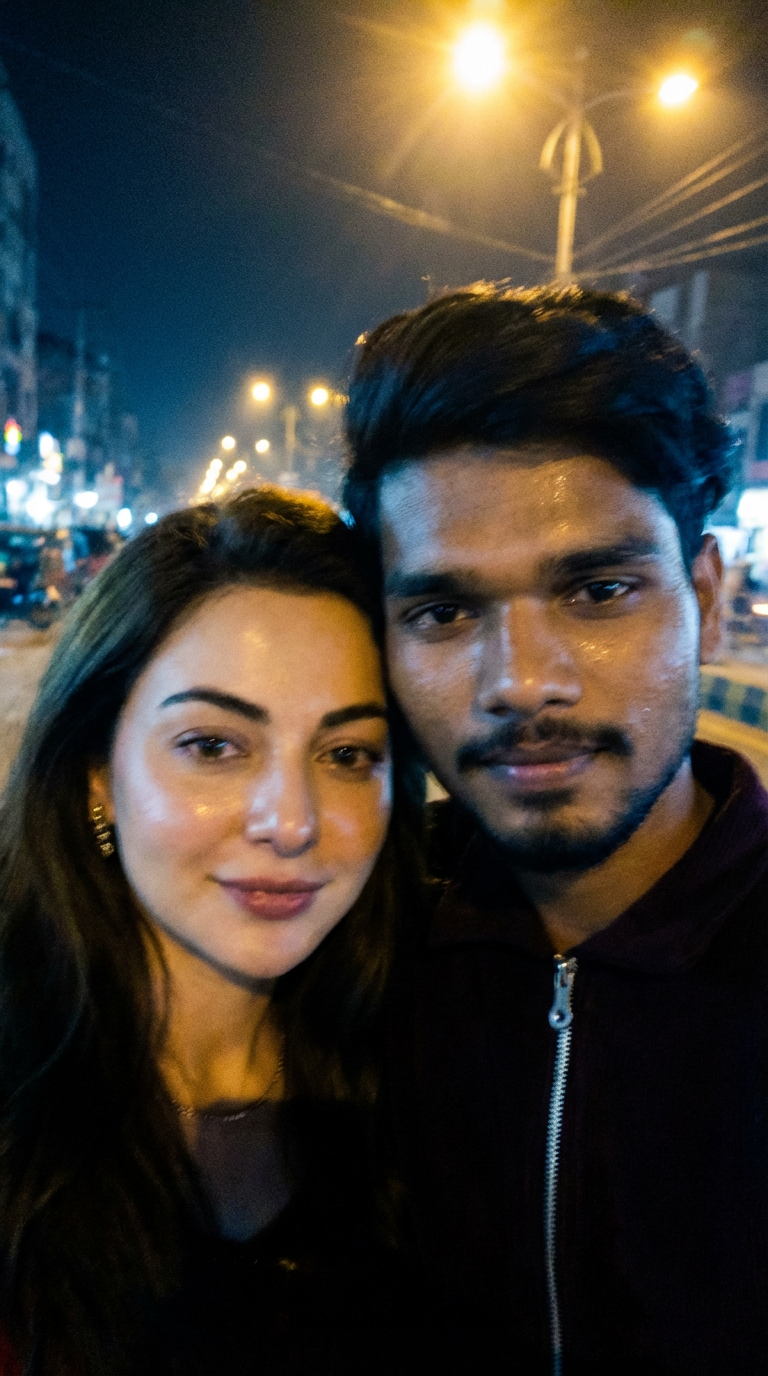
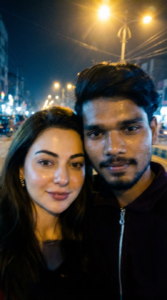
Use 100% of both faces above the image uploaded, Create an image of a selfie, without any clear subject or composition-just a random blueish snapshot taken unintentionally. The image should have slight motion blur and consistent lighting from streetlights. Both characters are together in the selfie and the image size ratio is 9:16 and does not change the facial features. Both skins are real skin texture do not use plastic skin don't change both faces and don't change both hairstyle.
✨ Prompt Use Karne Ka Tarika
1️⃣ Sabse pehle upar diya gaya prompt copy kare
2️⃣ Apni khud ki clear selfie image upload kare
3️⃣ Dusri image me celebrity / actress ki photo upload kare
4️⃣ Gemini / ChatGPT / kisi bhi supported AI tool me prompt paste kare
5️⃣ Generate hone ke baad best result download kar le
⭐ Best Result Ke Liye Tips
Dono images high quality aur clear face wali ho
Blur ya low-light photos avoid kare
Face angle aur lighting thodi similar ho to result aur realistic aata hai
📌 NoteYe prompt educational aur creative purpose ke liye share kiya gaya hai.Final output AI tool aur uploaded images par depend karta hai.
🔔 Aise aur trending AI photo prompts ke liye website ko bookmark karna na bhule.
Ye couple AI photo editing prompt un logon ke liye hai jo apni normal photos ko romantic, cute aur aesthetic couple look me convert karna chahte hain 💕Is prompt ki madad se aap couple selfies ko soft lighting, natural skin tone aur dreamy background ke saath AI generated photo me badal sakte ho.Ye prompt Instagram DP, reels thumbnail, WhatsApp DP aur couple posts ke liye kaafi useful hai.
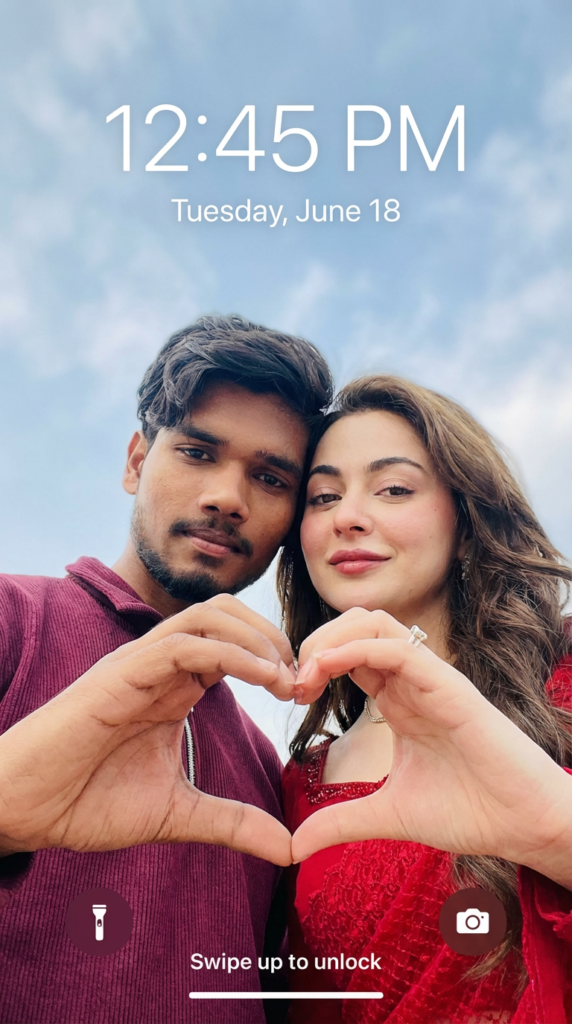
Use the uploaded selfie/selfies as the ONLY identity reference. Do not invent or change faces.Preserve exact face structure - face shape, jawline, nose, eyes, lips, forehead, skin tone, facial hair, skin texture, and natural smile.Keep real imperfections.Do NOT beautify, stylize, smooth skin, slim, reshape, or enhance features.Create a realistic SMARTPHONELOCK SCREEN WALLPAPERCreate a realistic SMARTPHONE LOCKCamera & Angle:Low-angle shot from below, as if the phone is placed beneath the subjects.Wide camera distance.Medium-wide framing.Upper body visible.NO zoom.NO portrait-mode blur.Pose:Two people standing close together, looking down at the camera, forming a heart shape together with their -hands in the foreground.hands in the foreground. Natural, casual, unposed expression.Framing:Centered subjects.Hands forming the heart clearly visible. Enough empty space above heads for lock screen text.Background:Open sky with soft daylight and light clouds. Natural colors only. No dramatic or cinematic skyLighting:Natural daylight.Slight uneven lighting like a real phone photo. No studio light.No glow.Style & Texture: Raw phone-camera realism. Natural skin texture. a Slight realistic noise/grain. Balanced contrast. No filters.Lock Screen UI:iPhone-style lock screen layout.Large centered time and date visible at the top.Wallpaper-style composition, not edited text.
✨ Prompt Use Karne Ka Tarika
1️⃣ Sabse pehle neeche diya gaya prompt copy kare
2️⃣ Apna favourite AI image generator open kare (gemini /ChatGPT / Gemini / Leonardo / Midjourney etc.)
3️⃣ Prompt paste kare aur apni couple photo upload kare
4️⃣ Generate hone ke baad best result download kar le
⭐ Best Result Ke Liye Tips
Clear aur achi lighting wali couple photo use kareDono faces clearly visible hone chahiyeBlur ya low-quality images avoid kare
📌 Note:Ye prompt sirf creative aur educational purpose ke liye share kiya gaya hai. Final result AI tool aur input image par depend karta hai.
👉 Aise hi aur trending AI photo editing prompts ke liye website ko regular visit kare.